
The audio — fictional example
Fictional 18-second audio, no real data:
Morning cash shift: 20 short in bills, extra coins. Morning shift counted, I reviewed. Check the 12:30 movement and confirm at the night close.
Do not use real names, IDs, or amounts in tests.
From audio to record
| Field | Fictional example |
|---|---|
| Source | 18s audio, morning shift, kept with date and shift |
| Exception | Cash difference: bills short, coins over |
| Action within permissions | Prepare the 12:30 review, do not move cash until the owner confirms |
| Owner | Morning manager decides; night close verifies |
| Next step | Confirm at the night close and leave a note for the count |
| History | The record returns to history so the next shift starts with context |
See it in action — demo with fictional data, no card. Secondary: Use a clean template.
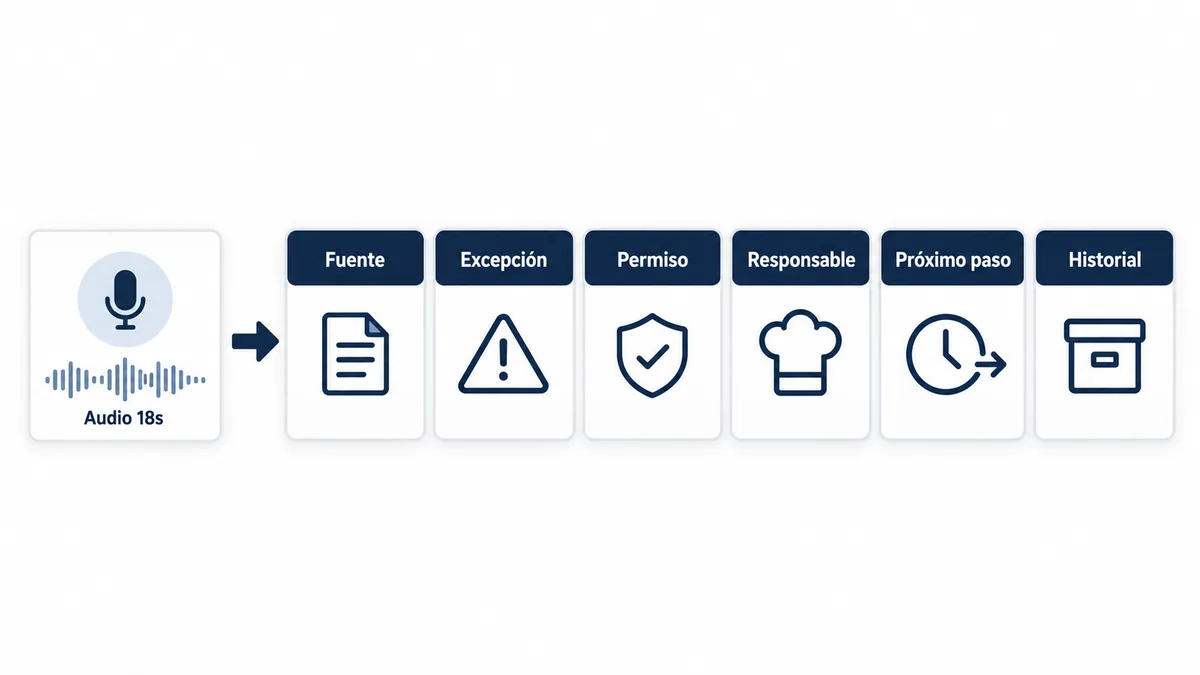
How it works
Wobistro preserves the source, identifies the exception, prepares an action within permissions, and records the responsible person's decision. Every result returns to the history so the next shift starts with context.
If the note is incomplete, ask only for the missing detail: shift, fictional test amount, or who confirms. Nothing closes without an owner.
What to always write down
- 1. Source and time.
- 2. What deviated.
- 3. What is proposed within permissions.
- 4. Who decides.
- 5. When it is verified.
Start with fictional data and a clean template in templates for starting with clean data. Full procedures in Resources. Evidence kept in reports that preserve evidence.
Next step
Try this flow with fictional data.
See it in action — demo with fictional data, no card.
Secondary: Use a clean template.
Reviewed
Source: Wobistro · 2026-08-12